
Free Twitch Overlays
Templates are free by the dozen. Free overlays your chat can actually play are far rarer.
Read with AI
Free Twitch overlays are on offer at Streamlabs, StreamElements, OWN3D and Canva. What counts as free differs a lot between them, and the line usually runs where a single template turns into a whole package. I read the details below on the providers' own pages on 18 October 2026.
What "overlay" means
"Overlay" covers two different things, and most search results mean only the first.
Looks: webcam frames, alert boxes, scenes for "Starting Soon" and "Be Right Back". These are graphics that sit above or below the game in OBS and do nothing.
Widgets: elements that show something or trigger something, such as your chat in OBS, a timer, or a game your chat plays with commands. They run in OBS as a browser source. This second kind is what I build.
What is free at the big providers
| Provider | Free | What sits behind it |
|---|---|---|
| Streamlabs | "Many overlays and widget themes" in the theme library | The full theme library is part of Ultra |
| StreamElements | Overlays, widgets and the SuperThemes (bundles of alerts, overlays and scenes) | The features page lists no restriction; I did not check prices |
| OWN3D | Individual packs such as Pure, Chroma and CleanValo, plus the Scene Builder and widgets | A free account has at most 6 installable scenes. The Stream Pass adds over 100 paid overlays, and single packs can be bought on their own |
| Canva | Free static and animated Twitch templates | There is a Pro plan; the page does not say what it unlocks for overlays |
I leave prices out: they change, and sources already disagree on the price of Streamlabs Ultra. The current figure is on the provider's own pricing page.
How to spot an overlay that is only half free
- A scene limit: OWN3D caps free accounts at 6 installable scenes.
- The library behind a subscription: at Streamlabs only part of the themes are free, the full library comes with Ultra.
- A provider app instead of a file: some overlays can only be installed through the provider's own program. A file you enter into OBS yourself stays usable even if you switch providers.
- A Pro plan without a list: if the page mentions "Pro" but does not say what it adds for overlays, the answer only shows up at checkout.
Free chat overlays and chat games
The Chat Overlay, Ball Drop, Duel and Win Challenge run as a browser source in OBS and react to your chat.
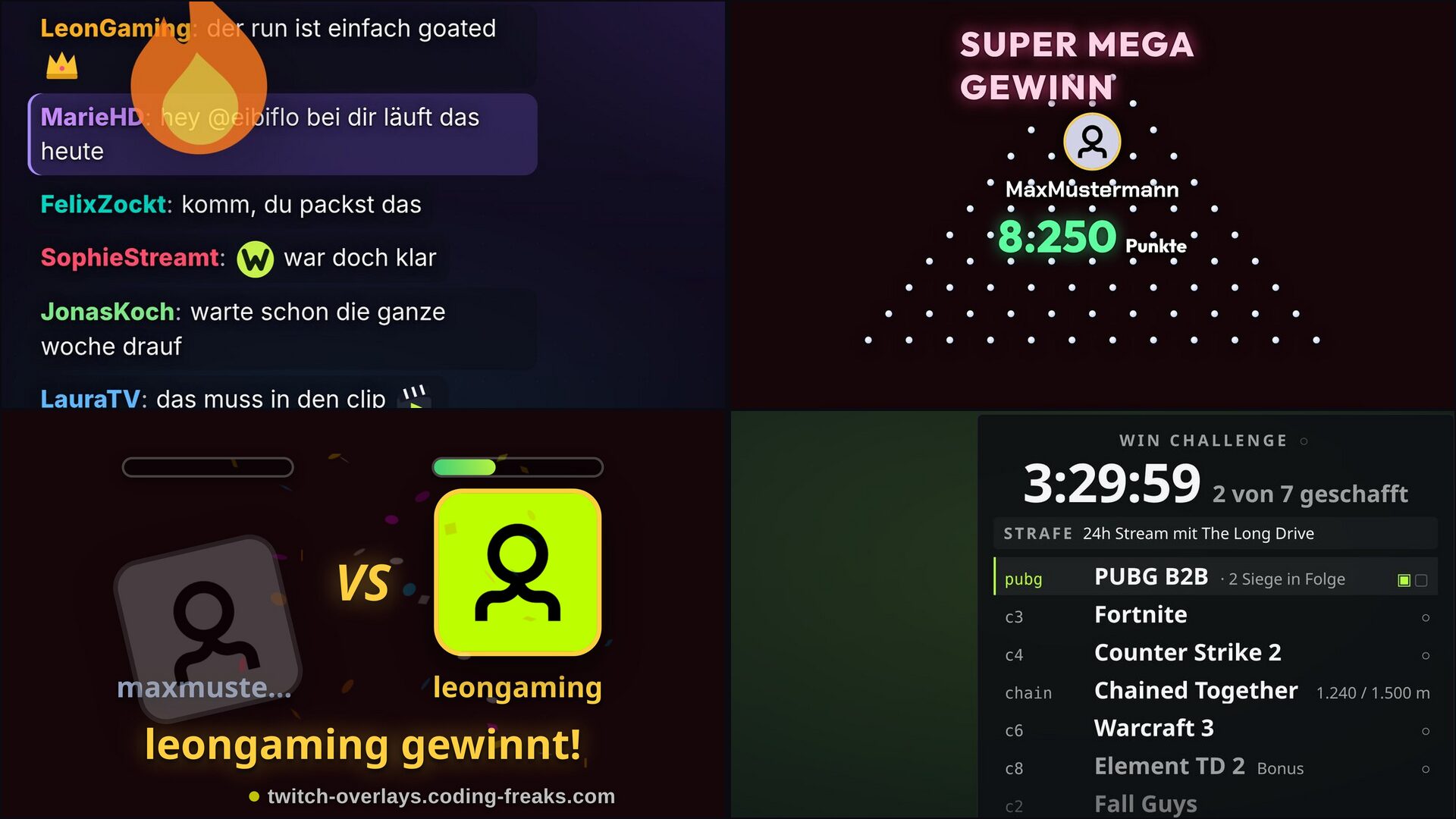
These overlays of mine cost nothing:
- Chat Overlay: your Twitch chat as an overlay, 7TV emotes fly off animated.
- TTS: your chat gets a voice,
!sayreads messages aloud live. - Win Challenge: a task list across several games with a time limit and a penalty.
- Ball Drop: chat drops balls, the pins steer, the slot at the bottom pays.
- Duel: viewer against viewer, the winner takes the stake.
- Focus Room: one Pomodoro timer for everyone, task lists of their own for you and your chat.
- Clip: chat calls
!clip, and OBS saves the last few seconds as a file, retroactively. - Privacy Cover: an opaque panel over your scene that only opens while you hold the button.
Free here means: download and use cost nothing. You need OBS and a browser source. Games that run on points also need a bot with a currency, meaning StreamElements, Streamer.bot or Firebot. Which bot suits you is covered in StreamElements Alternatives Compared, the connection in Connect your overlay to Streamer.bot. The remaining overlays (Roulette, Slots, Mines, Blackjack and others) are supporter overlays and get unlocked when you support the project.
Adding a free overlay to OBS
You pick the overlay in the Config Hub, add a browser source in OBS with the "Local file" option, and set the size to 1920 by 1080. The steps with screenshots are in Set up an overlay in OBS.
Frequently asked
Which Twitch overlays are really free?
At Streamlabs, StreamElements, OWN3D and Canva a part is free, the rest sits behind a subscription or a purchase. Of my own overlays, the Chat Overlay, TTS, Win Challenge, Ball Drop, Duel, Focus Room, Clip and Privacy Cover are entirely free, among others.
Are Streamlabs overlays free?
In part. Streamlabs says itself that many overlays and widget themes are free, but the full theme library is part of Ultra (as of 18 October 2026).
Are there free overlays where chat can play along?
Yes, for example Ball Drop and Duel. Chat starts a round with a command and the overlay shows it in OBS. Games that run on points need a bot with a currency.
Do I need StreamElements or Streamer.bot for overlays?
Not for looks such as frames and scenes. Not for chat overlays without points either (Chatbox, TTS, Clip), they read chat directly. You only need Streamer.bot, StreamElements or Firebot once points are paid in and out.
What is the difference between an overlay, an alert and a widget?
An overlay is anything that sits on top of the picture in OBS. An alert is a message for an event, such as a new follower. A widget is an element with a function, for example a timer or a chat display.
How do I add a free overlay to OBS?
As a browser source. For overlays from the Config Hub you choose "Local file" and set 1920 by 1080.